
Upscale Images to 4K: Get Crisp Anime Wallpapers
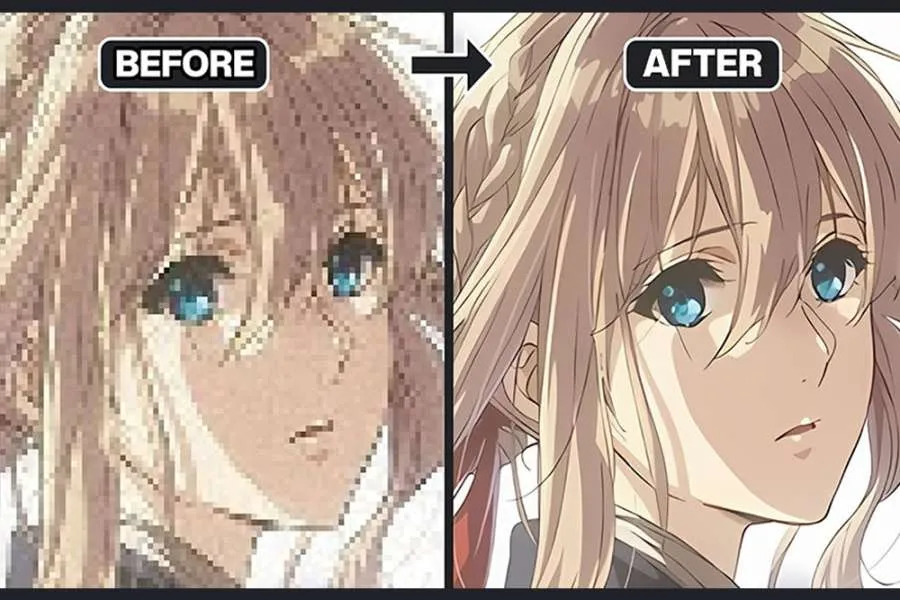
Got a favourite anime moment you want to use as a 4K wallpaper? You grab a screenshot, set it as your background, and it looks… blurry. Those sharp lines and vibrant colours turn into a pixelated mess on your high-resolution monitor. It’s a common frustration that ruins the impact of your favourite scenes.
The problem isn't your screen; it's the image's original resolution. Most anime is produced in 1080p or even 720p, which is much smaller than a 4K display. When you stretch that small image, the quality drops fast.
Luckily, you don't need complex software to fix this. The solution is using a powerful AI Image Upscaler to intelligently enlarge your screenshots without losing clarity.
Why Your Anime Screenshots Look Blurry on a 4K Monitor
Understanding the problem helps you see why AI is the best solution. It all comes down to pixels, the tiny dots that make up a digital image.
A standard 1080p (Full HD) image contains about 2 million pixels. A 4K (Ultra HD) screen, on the other hand, displays over 8 million pixels. When you try to fill a 4K screen with a 1080p image, your computer has to "invent" 6 million new pixels to fill the gaps.
Traditional methods just guess what those new pixels should be, which leads to common issues:
* Pixelation: You start to see the individual square pixels, making the image look blocky.
* Blurriness: To hide the blockiness, software might blur the edges, resulting in a soft, out-of-focus look.
* Artifacts: Strange visual errors, like jagged lines or halos around characters, can appear.
Anime is especially vulnerable to these problems because of its distinct art style. The clean lines, flat areas of colour, and sharp details are the first things to suffer when an image is stretched improperly. This is where an advanced AI Photo Editor with upscaling capabilities makes a huge difference.
The Top Choice: How AI Delivers Flawless 4K Anime Images
Instead of just stretching pixels, AI upscalers use a completely different approach. They are trained on millions of images, learning what things like character outlines, eyes, hair, and backgrounds are supposed to look like.
When you upload your anime screenshot, the AI analyses it on a deep level. It recognises the patterns, textures, and lines specific to anime art. Then, instead of guessing, it intelligently redraws the image at a higher resolution. It adds new pixels that are contextually accurate, resulting in an image that looks like it was originally created in 4K.
This process excels at:
* Recreating Sharp Lines: The AI knows how to draw clean, crisp outlines without making them look jagged or artificial.
* Preserving Vibrant Colours: It maintains the bold, solid colours of the original art style without washing them out.
* Adding Fine Detail: The technology can even enhance subtle details in the background or character clothing that were barely visible in the original.
For anime fans, this technology is a breakthrough. It allows you to transform any standard screenshot into a brilliant piece of art that looks incredible on any modern display.
A Simple Guide to Upscaling Anime Screenshots to 4K
You don't need any technical skills to get professional results. The process is straightforward and only takes a minute.
#### Step 1: Choose Your Source Image
Start with the best possible screenshot you can get. While the AI can work miracles, a higher-quality starting point will always yield a better final result. Try to find a 1080p source if you can. Avoid heavily compressed or tiny images if possible.
#### Step 2: Upload to the AI Upscaler
Navigate to an AI image upscaler tool. Most have a simple interface where you can drag and drop your file or click a button to upload it from your computer. The tool will immediately start analysing your image.
#### Step 3: Select Your Upscaling Factor
To go from 1080p to 4K, you'll need to increase the image size by 400%, or 4x. A 1920x1080 image upscaled by 4x becomes 7680x4320, which is perfect for 4K (3840x2160) and even 8K displays. Most tools offer presets like 2x and 4x, so just select the 4x option.
#### Step 4: Process and Download
Once you’ve selected your setting, let the AI work. In just a few seconds, it will generate a preview of your new, high-resolution image. You can compare it side-by-side with the original to see the dramatic improvement. If you're happy with it, just click the download button to save your new 4K masterpiece.
Best Practices for Perfect Anime Upscales
Following a few simple tips can help you get the most out of the technology and ensure your results are always stunning.
Start with a Good Foundation
The better the source, the better the output. If you're grabbing a screenshot from a streaming service, make sure your video quality is set to the highest possible option (usually 1080p). A clean, uncompressed image gives the AI more data to work with, leading to a more detailed and accurate upscale.
Pay Attention to the Art Style
Anime from different eras have different visual characteristics.
* Modern Digital Anime: Series made in the last decade are typically clean and sharp. They upscale beautifully, and the AI has an easy time defining the lines and colours.
* 90s and Early 2000s Anime: Shows from this era often have a distinct film grain or "cel" look. A good AI upscaler will preserve this texture without mistaking it for noise. It enhances the image while retaining its nostalgic feel.
* Older, Vintage Anime: For shows from the 70s or 80s, the source quality can be lower. The AI does an excellent job of cleaning up these images, reducing blur and artefacts to make them look better than ever before.
Don't Be Afraid to Experiment
Sometimes, an image might have some minor imperfections even after upscaling. You might want to adjust the brightness, contrast, or colour saturation to make it pop even more. Many AI platforms include basic editing tools that let you make these final adjustments right after you upscale, giving you complete control over the final look.
Beyond Wallpapers: Other Uses for Upscaled Images
Creating stunning 4K wallpapers is just the beginning. Once you have a high-resolution version of your favourite anime art, you can use it for many other creative projects.
* High-Quality Social Media Posts: Standard screenshots can look compressed and ugly on platforms like Instagram or Twitter. An upscaled image will stay sharp and clear, making your posts stand out.
* Custom Printing: Want to print a poster, a t-shirt, or a custom phone case? You need a high-resolution file to avoid a blurry, unprofessional result. An AI-upscaled image is perfect for physical merchandise.
* Fan Projects and Edits: If you create fan art, video edits, or analysis content, having a library of crisp, 4K source material is essential. It raises the production value of everything you make.
* Archiving and Preservation: For fans of older or more obscure series, upscaling can help preserve iconic scenes in a modern format, ensuring they don't get lost to low-resolution video standards.
The Final Word
Your high-resolution monitor is designed to display incredible detail and colour. Don't let low-resolution screenshots hold it back. By using an AI image upscaler, you can finally make your favourite anime moments look as epic as they deserve to be. The process is fast, easy, and transforms blurry pictures into amazing 4K visuals ready for any screen or project.
Share: