

Remove TikTok watermarks for flawless reels
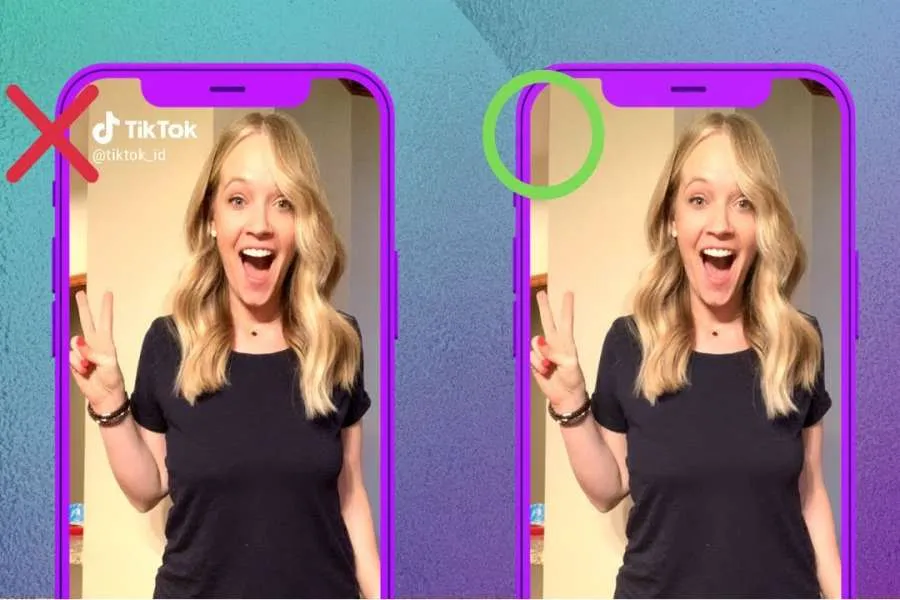
You spent hours perfecting that short video. The timing, the cuts, the audio, it’s all perfect. You posted it to TikTok and it’s getting great engagement. Now, you want to share that success on Instagram Reels, but there’s one big problem: the distracting TikTok watermark that bounces around the screen.
Your first instinct might be to just crop the video. It seems like a quick fix, but it's one of the worst things you can do. Cropping butchers your video's framing, cuts off important content, and screams "I just downloaded this from another app." To maintain a professional look across your social media channels, you need a clean, watermark-free video.
Fortunately, getting a pristine copy of your video for Reels is easier than ever. You don't need complicated editing software or technical skills. The solution is a dedicated tool designed to erase watermarks while keeping your video quality intact.
WHY YOU SHOULD NEVER CROP A WATERMARKED VIDEO
Before we get into the solution, let’s talk about why cropping is a bad strategy for repurposing content. While it might feel like a simple workaround, it creates more problems than it solves and can hurt your content's performance.
First, you lose visual information. Social media videos are crafted to fit the 9:16 vertical frame perfectly. When you crop the top, bottom, or sides, you risk cutting out key parts of the action or subject. This can make your video confusing or just awkward to watch.
Second, it ruins the composition. You carefully framed your shot for a reason. Cropping throws that balance off, leading to a video that looks unprofessional and poorly planned. Finally, the TikTok watermark often moves during the video, so a simple static crop might not even remove it completely. You could end up with a badly framed video that still has a partial watermark.
THE BEST WAY TO REMOVE TIKTOK WATERMARKS
The most effective method for cleaning your videos is to use a tool that intelligently removes the watermark without altering the video's dimensions or resolution. Modern solutions use AI to analyse the pixels surrounding the watermark and fill in the space, making it look like the watermark was never there. This approach gives you a truly clean video file ready for any platform.
For creators who need a reliable and fast solution, the right tool is essential. A top-tier Video Watermark Remover handles this process in just a few clicks. You simply provide the link to your TikTok video, and the technology does the heavy lifting, delivering a high-quality, clean MP4 file ready for you to upload. This preserves every pixel of your original creation.
With the rise of generative AI, creators are also working with content from new sources. Maybe you're using incredible clips made with OpenAI's new model. In these cases, you’d need a specialised tool like a Sora Watermark Remover to handle those specific watermarks. Using a dedicated suite of tools ensures you're prepared to handle content from any source.
STEP-BY-STEP GUIDE: HOW TO GET A CLEAN VIDEO
Getting a watermark-free version of your video is a straightforward process. You don't need to download any clunky software or sign up for a complicated service.
Here’s how it works:
1. Get Your TikTok Video Link: Open the TikTok app and navigate to the video you want to use. Tap the "Share" button and then select "Copy Link."
2. Go to the Remover Tool: Open your web browser and head to the video watermark remover website.
3. Paste the Link: You'll see an input box on the homepage. Paste your copied TikTok link into this field.
4. Process and Download: Click the process or "Remove Watermark" button. The tool will analyse the video, remove the watermark, and provide you with a download link for the clean MP4 file.
That's it. In under a minute, you’ll have a professional-looking video that you can upload directly to Instagram Reels, YouTube Shorts, or any other platform without any distracting logos.
UNDERSTANDING HOW WATERMARK REMOVAL TECHNOLOGY WORKS
What's happening behind the scenes when you use one of these tools? It's not just placing a blurry box over the logo or cropping the frame. Modern watermark removers use sophisticated AI algorithms to achieve a seamless result.
This technology is often called "inpainting." The AI identifies the watermark's location in every frame of the video. It then analyses the surrounding pixels, including colours, textures, and patterns, to understand what the background should look like. Once it has this context, it reconstructs the area where the watermark was, essentially "painting" it over with a clean background.
The result is a video where the watermark vanishes without a trace. This is a massive improvement over older methods that would leave behind obvious smudges or blurs. Because the AI rebuilds the background pixel by pixel, it preserves the original video quality and looks completely natural. This is why it’s the preferred method for serious creators and marketers who care about their brand image.
BEST PRACTICES FOR REPURPOSING CONTENT ACROSS PLATFORMS
Removing the watermark is the first step, but a smart content strategy goes a little deeper. Simply reposting the exact same video everywhere isn't always the most effective approach. Here are a few best practices to follow when repurposing your TikTok videos for Instagram Reels.
Adjust for Each Audience
While the user bases of TikTok and Instagram often overlap, the culture and expectations on each platform can be different. What works as a caption on TikTok might not land the same way on Instagram. Take a moment to write a fresh caption that feels native to the Instagram platform. Engage with your audience by asking questions or encouraging them to comment.
Optimise Your Audio Choice
Trending sounds are a huge part of what makes a video take off. A sound that’s trending on TikTok might not be trending on Reels at the same time. After you download your clean video, consider uploading it to Reels without sound. Then, use Instagram’s audio library to add a song or sound that is currently popular on that platform. This can significantly boost your video's visibility.
Use Platform-Specific Hashtags
Don't just copy and paste your hashtags from TikTok to Instagram. Each platform has its own hashtag ecosystem. Research relevant and trending hashtags directly on Instagram to ensure you’re reaching the right audience. Instagram also allows for more hashtags in a caption, so you can often be more descriptive and targeted with your choices.
Check the Timing of Your Post
The best time to post on TikTok might not be the best time to post on Instagram. Your audience's activity patterns can vary between apps. Use your Instagram Insights to see when your followers are most active and schedule your Reels to post during those peak times. Posting when your audience is online gives your content the best possible chance to get initial traction.
Frequently Asked Questions (FAQ)
If you're new to repurposing video content, you probably have a few questions. Here are some answers to the most common ones.
Is it legal to remove a watermark from a video?
When it comes to your own content, yes, it is perfectly fine to remove a watermark. You created the video, and you own the rights to it. The purpose of a watermark remover is to help you use your own creations on different platforms. However, you should never remove a watermark from someone else's video and post it as your own. That would be copyright infringement. Always get permission before reposting another creator's work.
Will removing the watermark reduce my video quality?
Not if you use a high-quality tool. The best watermark removers are designed to preserve the video's original resolution. The AI technology carefully reconstructs the background without compressing or degrading the rest of the video. The final product should be just as crisp and clear as the original upload.
Can I remove a watermark on my phone?
Absolutely. Most modern watermark removal tools are web-based, which means they work directly in your browser. You don’t need to install any apps. You can just as easily copy a link on your phone, open your mobile browser, and process the video on the go.
Final Thoughts
Repurposing your video content is one of the smartest things you can do to grow your audience and maximise your reach. But doing it the right way is critical. A bouncing TikTok watermark on your Instagram Reel can look unprofessional and may even be penalised by the algorithm.
By taking a few extra seconds to use a video watermark remover, you ensure that your content looks its best on every platform. You keep your perfect framing, maintain your video quality, and present a polished, professional brand to your audience. It’s a simple step that makes a world of difference.
Share: